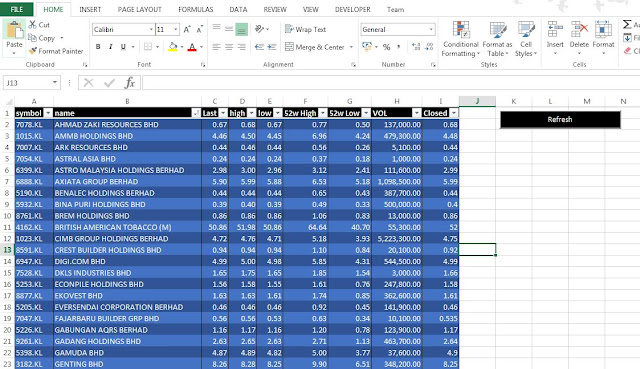
Here my new post on how to use excel macros to get stocks price. You can refer screen shot below, there's table on the stock name, pricing, volume and etc. I'll explain head and tail of how to build this excel macros. Step to get the stock price from internet Insert a button into the excel worksheet.(Developer->Insert Button) Create excel macros name after insert the button and edit text in button. Insert title into worksheet and click the format as table . (Choose your format). The table format will look like below and insert code into macros. Add winHttp in VBA references. (Tools > References) Insert macros code. Done. You can run you program now. If you any issue please drop me email. Macros Code: Sub btnRefresh_Click() Dim W As Worksheet: Set W = ActiveSheet 'Find last row in worksheet Dim Last As Integer: Last = W.Range("A1000").End(xlUp).Row '...
Your style is so unique compared to other people I have read stuff from. Many thanks forposting when you have the opportunity, Guess I will just bookmark this site Macro Recorder
ReplyDelete